




Mongoose Pro for Jaguar-Land
Rover
\n
- \n
- Jaguar-Land Rover has approved the
Mongoose Pro - JLR as a supported interface and will
offer it directly to Jaguar and Land Rover dealerships as the factory
diagnostics tool. - Mongoose Pro JLR is a low-cost VCI
for factory diagnostics and reprogramming. - Support
for L316, L319, L320, L322, L359, L538 Land Rover vehicle lines. - Support for X100, X150, X202, X250, X350, X351, X400 Jguar vehicle
lines. - Diagnostics Trouble Codes
- Data Lists
- Active Tests
- Monitor
- Utility tests
- Reprogramming
\n
\n
\n
\n
\n
\n
\n
\n
\n
\n
\n
\n
\n

\n
Key
Features
\n
- \n
- USB support for HSCAN, MSCAN,
J1850PWM, ROSCO, and ISO9141/KWP2000 vehicles - Simple
packaging with electronics contained inside the cable. - Unique Advantages\n
- \n
- Jaguar and Land Rover
approved low-cost interface
\n
\n
- Jaguar and Land Rover
- Bus Protocols\n
- \n
- CAN Bus (capable of ISO
15765, GMLAN, and ISO14229) - Medium Speed
CAN - J1850PWM / SCP
- ISO9141 /
KWP2000 - ROSCO
\n
\n
\n
\n
\n
\n
- CAN Bus (capable of ISO
- Operating System Compatibility\n
- \n
- Windows 10
64-bit is recommended for compatibility with OEM
applications.
\n
\n
- Windows 10
- Other\n
- \n
- J2534 and J2534-1 compliant device
driver - Commercial Range (0 to +70 C)
- Dimensions: 3″ x 1.75″
- Operating
Voltage: Bus-powered by USB - Host Interface:
Full-speed 12 Mbps USB 2.0 with J2534 device
Driver
\n
\n
\n
\n
\n
\n
- J2534 and J2534-1 compliant device
\n
\n
\n
\n
\n
\n
\n
IDS
(Integrated Diagnostic Software)
\nIDS was used by
Jaguar dealerships for vehicles manufactured pre-2005. Land Rover also used
IDS however the interface we can only supply will only work with the Jaguar
side of IDS. The user interface does look dated compared to the newer SDD
however it is still a very reliable piece of software that is still used in
the Jaguar dealerships throughout. Our IDS software is only suitable for
Jaguars pre-2005, it is not suitable for any Land Rover pre-2005. It allows
you to do the following: Fault Code Reading / Resetting analysis for
repairs\n
- \n
- Service Lights
- Read
/ Clear / Reset Air bag Light codes - Read / Clear /
Reset ABS Light codes - Programming
Modules - Programming personalization like ride height
or folding wing mirrors. - Activate pumps for brake
bleeding - Program new DSC units
- Program
ABS Units
\n
\n
\n
\n
\n
\n
\n
\n
\n
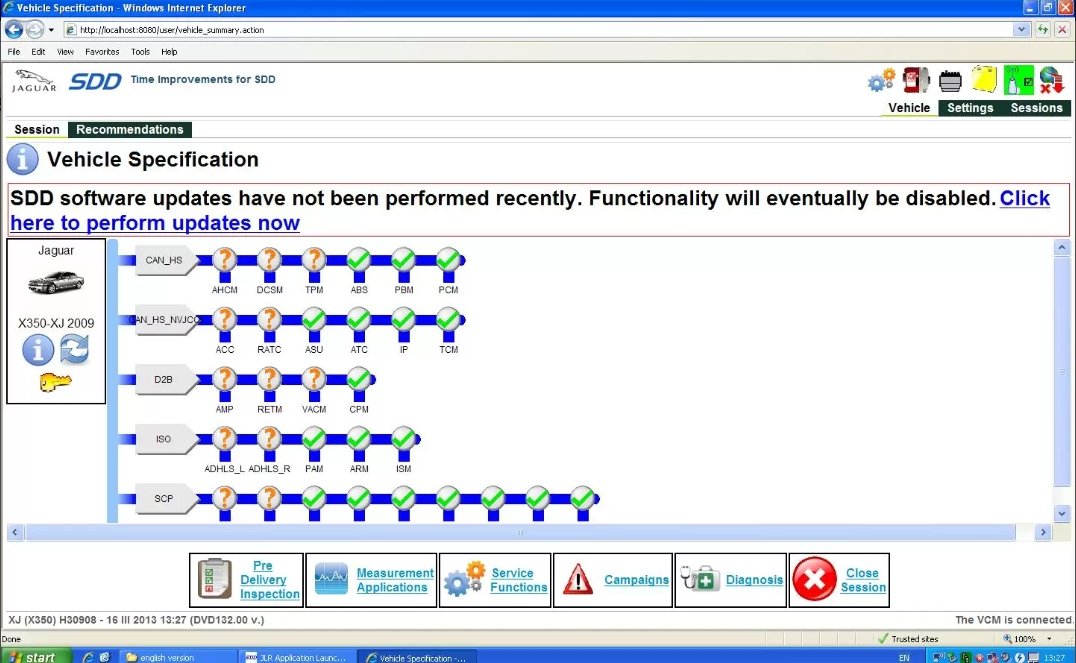
SDD (Symptom Driven
Diagnostics)
\nSDD is the latest development by JLR in vehicle
diagnostics. Designed to be easy to use and extremely efficient in fault
finding. Conventional diagnostic systems read fault codes and offer them to
the end user. It is then up the the end user to analyse the codes and find
the vehicle fault from the data that has been provided.\nSDD instead asks the
end user about the fault with the vehicle progresses to analyze the fault
codes and offers the solution to fix the vehicle on a relevance to likely
ratio.\nShould you wish to intervene and only see the fault codes then this
option is open to the end user but keep in mind, that SDD was developed to
recommend the repairs.\nAlongside diagnostics, the service functions allow
vehicle and module programming and vehicle customization.\nA selection of
what can be done with SDD:\n
- \n
- Fault Code Reading /
Resetting analysis for repairs - Service
Lights - Read / Clear / Reset Air bag Light
codes - Read / Clear / Reset ABS Light
codes - Programming Modules
- Clearing adaptions
- V130 Programming extra
keys - Programming personalization like ride height or
folding wing mirrors. - DPF Regeneration
- Activate pumps for brake bleeding
- Adjust
vehicle heights - Program new DSC
units
\n
\n
\n
\n
\n
\n
\n
\n
\n
\n
\n
\n
\n
Making SDD effective when selecting
Vehicle symptoms for your Jaguar & Land Rover
\nSDD is
designed to link DTCs and provide recommendations based on customer-facing
and/or the most significant symptoms. Do not try to short-cut or refine the
customer’s reported symptoms based on expected failures. If the primary or
most obvious Customer-facing symptom is an MIL or message center warning,
those symptoms MUST be included in your symptom selection inputs using SDD.
While it might seem logical when selecting ‘Air Suspension is inoperative’
that there is no need to select the symptom ‘Message center warning’, it is
important to do so. Otherwise, SDD may exclude DTCs or recommendations that
relate to failures known to trigger a warning message or MIL. Be sure to
select any additional symptoms observed during a road test in addition to the
most obvious symptoms and customer-reported info. Altering the selected
symptoms adjusts the filtering of the DTCs. Selecting fewer symptoms makes
the filter ‘coarser’ while selecting more symptoms makes the filter
‘finer’.\n
- \n
- If very few or no DTCs and recommendations
are listed, try restricting your symptom selections to Level 3 in the symptom
tree. - If too many DTCs or recommendations are listed,
try selecting symptoms to Level 4 or 5, using care not to select an
inaccurate symptom.
\n
\n
\nTo be sure that you are only
working with your intended symptom list: open the ‘Selected Symptoms’
drop-down box at the upper right portion of the Symptom Selection tab to
review all currently selected symptoms. Avoiding Common SDD Symptom Selection
Errors Powertrain > Engine system > Starting system >
Start-stop system: Note that the Start-Stop System is a fuel-conserving
technology used on diesel vehicles sold in other markets. This is not
associated with the ‘Start Button’ used to actuate the ignition on Smart
Key-equipped vehicles. Warning Lamps, Status Lamps, and Message Center Use
care when entering symptoms related to customer complaints of MIL lights and
warnings. When a light and a message are reported or observed, both of these
symptoms must be included. When viewing the symptom categories within the
Electrical > Instrument Cluster section, there are 3 classes of
‘driver information’ symptoms:\n
- \n
- Warning Lamps
(red) - Warning Messages (in Message
Center) - Status Lamps
(yellow)
\n
\n
\n
\nWhile it is easy to distinguish between a
Warning Message and a Warning Lamp that is currently active, if the problem
is intermittent, the service writer must determine through careful
questioning of the customer if a warning lamp, warning message, or both were
displayed. Also, not every MIL is considered a Warning Lamp since some
indicators on the instrument cluster are used to indicate the status of a
system. Examples of Status Lamps include the Passenger Seat Occupancy Status
Lamp and the TPMS Status Lamp. Using the Passenger Seat Occupancy Status Lamp
as an example: this light is only used to indicate the status of the
passenger seat. When lit, it simply indicates that the SRS system has
determined that based on the current inputs, the passenger restraints will
not be deployed. It does not mean the system has detected a failure that
requires a driver warning. For this reason, the lamp is classified as a
Status Lamp. Similarly, the amber TPMS indicator is used to inform the driver
that the tire pressure requires attention. While this light may remain lit
when a system malfunction exists, it is considered a Status Lamp since its
primary function is to inform the driver of the tire pressure status.
Recommendation: When selecting SDD symptoms for lamps that are primarily
considered a Status Lamp, but are also known to have a secondary function as
a Warning Lamp, be sure to select the symptoms under both categories in the
symptom selection map.\n\nNew Diagnostic
Process\nIDS has been updated to provide a clear diagnostic
strategy and tool navigation path to the technician. With Symptom Driven
Diagnostics (SDD), the technician can begin the diagnostic process by
identifying the specific symptoms of a customer concern using Symptom Maps
incorporated into the SDD software. A diagnostic strategy can then be
structured around only the DTCs that are relevant to those symptoms. SDD can
also provide links to other service information to support the diagnostic
process.\n\nSymptom Maps\nSymptom Maps are incorporated into the SDD
software, allowing the technician to target DTCs and diagnostic routines
based on specific symptoms. Symptom Maps are organized by major vehicle
system as follows:\n
- \n
- Module Communications
Network - Chassis
- Powertrain
- Electrical
- Body
\n
\n
\n
\n
\n
\nMaps
are then further structured by System and Sub-System details to provide lists
of possible symptoms at 2 levels.\nSymptom Maps are used by SDD in
conjunction with DTCs. To ensure the best possible recommendations to achieve
FRFT repairs, the technician must input ALL vehicle symptoms that match the
customer's concern.\nThe Integrated Diagnostic System (IDS) core architecture
dates from 1999 and incorporates elements going back as far as 1995. In the
meantime, vehicle technology has become more complex and the number of
vehicle variants has increased.\nCurrent vehicle systems support up to 4,000
different Diagnostic Trouble Codes (DTCs), which increases the complexity of
diagnostics. The technician now needs to diagnose systems, not merely
individual components.\nWithout a clear strategy for a repair process, a
technician faced with up to 40 DTCs at the start of an IDS session can easily
lose confidence in the diagnostic tool.\nFeedback data from dealerships shows
inconsistent methods of fault diagnosis with underutilization of the IDS
capabilities.\nThis has resulted in high ‘No Fault Found’ repair rates,
difficulty in achieving Fixed Right First Time (FRFT) repairs, and an
increase in the time that a customer’s vehicle is off the
road.\n
Why it’s useful to have your own Jaguar & Land Rover
Diagnostic kit?
\nIn the last 7 years, the diagnostics industry has
boomed. Vehicles have become more complicated with more electrics and
fast-moving technology piled in. The result of having all these “mini
computers” running in your vehicle is that when it goes wrong they require
another computer to diagnose what is wrong and fix them. The Jaguar and Land
Rover Diagnostic kits are suited to various people. If you plan on doing your
repairs on your JLR vehicle then it goes without saying that you do need your
diagnostic kit. Being able to have access to something like IDS & SDD
when finding out which part has failed is crucial. It speeds up your
diagnostics and more importantly, makes it far more accurate. With a good
quality diagnostic kit, you can avoid replacing parts unnecessarily in the
hope of curing your fault. Some owners like to do minor ECM programming
changes themselves, a good example would be to turn on folding mirrors. When
doing an extremely minor job like this you can expect the dealer to charge a
minimum of 30 minutes of labor. However, the actual job is 5-10 minutes the
time can easily stack up including commuting to the JLR dealership. You can
expect a bill of around £55-65 to do a minor programming job like this unless
you try and combine it with a service and sweet talk the rep!\n\nIn the last
7 years, the diagnostics industry has boomed. Vehicles have become more complicated
with more electrics and fast-moving technology piled in. The result of having
all these “mini computers” running in your vehicle is that when it goes wrong
they require another computer to diagnose what is wrong and fix it Jaguar and
Land Rover Diagnostic kits are suited to various types of
people.\n
JLR IDS SDD PATHFINDER YEARS
COVERED
\n
- \n
- 2013
- 2012
- 2011
- 2010
- 2009
- 2008
- 2007
- 2006
- 2005
- 2004
- 2003
- 2002
- 2001
- 2000
- 1999
- 1998
- 1997
- 1996
\n
\n
\n
\n
\n
\n
\n
\n
\n
\n
\n
\n
\n
\n
\n
\n
\n
\n
\n
JLR IDS SDD PATHFINDER
SOFTWARE FEATURES
\nDTC Code Retrieval:\n
- \n
- Retrieve
OE DTC with code Definition - Link DTC to service
information - Customizable PID
display
\n
\n
\n
\nData Logging:\n
- \n
- Body
- Chassis
- Powertrain
- Pressure/Vacuum
Tests
\n
\n
\n
\n
\nBi-Directional tests:\n
- \n
- Body
- Chassis
- Electrical
- Powertrain
\n
\n
\n
\n
\nNetwork
Test:\n
- \n
- >CAN
- J1850/ISO9141/SCP
\n
\n
\nModule
Programming:\n
- \n
- Programmable Module Installation (PMI)
procedures - >Module Reprogramming
(Reflash) - Coding
- Supplemental
restraints initialization - >Programmable
Parameters (ability to change service settings ie, tire size, personality,
customer convenience, etc.)
\n
\n
\n
\n
\n
\nBody
Controls:\n
- \n
- Anti-theft System Functions
- Remote Keyless Entry
- Restraints
(supplemental restraints and seat belts)
\n
\n
\n
\nChassis
Tools:\n
- \n
- ABS Service Bleed
- ABS/ Brake system functions
- IVD
Initialization Sequence - Ride Height Calibration ( for
vehicles with pneumatic or hydraulic ride height controls) - Cruise Control System tests
- Tire pressure
monitor functions - Electronic Ride
Control
\n
\n
\n
\n
\n
\n
\n
\nElectrical Tools:\n
- \n
- Charging System Tests
- Parking Aid
Tests - Audio
\n
\n
\n
\nPowertrain
Tools:\n
- \n
- EVAP Evaporative Emission Control
System - Fuel System Test/Relative Injector Flow
Test - Bi-directional control of fuel
components - Bi-directional Ignition System
control - Power Balance Test
- Transmission bi-directional Tests
- Engine
Checks and OBD Tests (Drive Cycle, Mode 01, Mode 06 & Mode
09) - EGR Test
\n
\n
\n
\n
\n
\n
\n
\n
\nDigital
Multimeter:\n
- \n
- Basic DMM functions
- Current measurements (50 Amps/500 Amps)
- Pressure/Vacuum measurements
\n
\n
\n
\nPROGRAMMING
KEYS & TRANSPONDERS:\n
- \n
- YES
SUPPORTED
\n
\nIDS Legacy Tools for Jaguars 1997
-2005:\n
- \n
- YES
SUPPORTED
\n
\n
Related products


JLR Software
JLR Software

JLR Software

JLR Software

JLR Software

JLR Software