

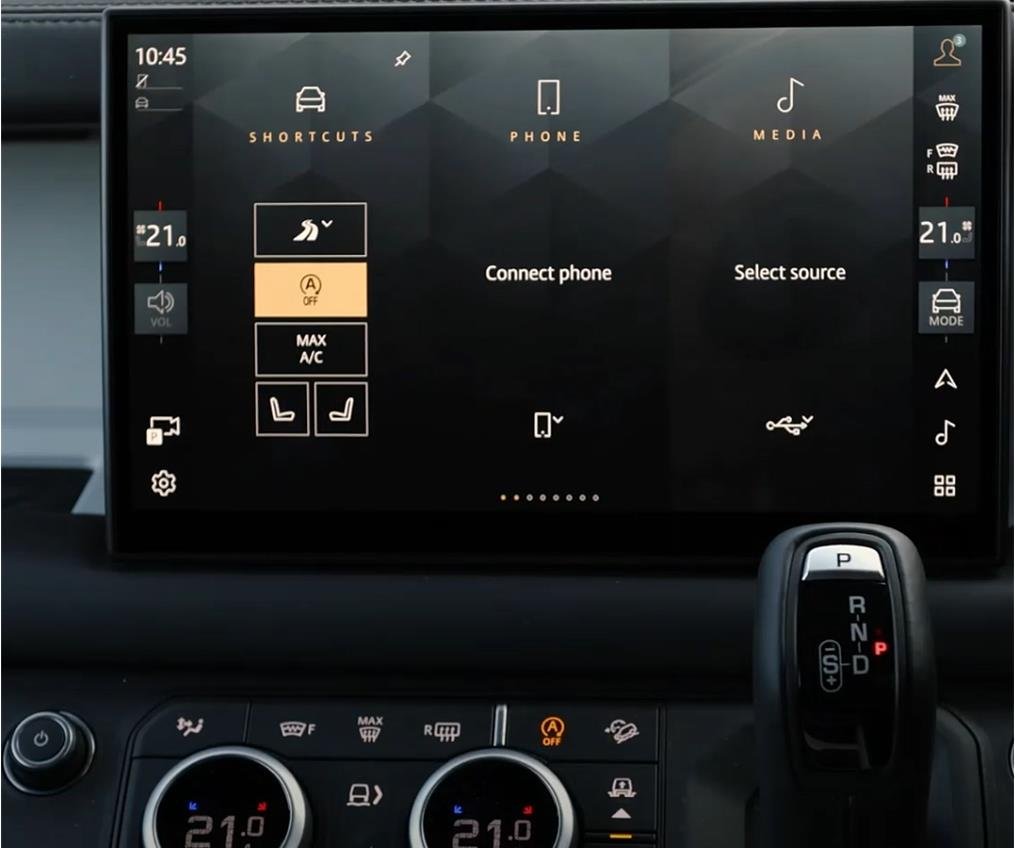

Technical Configuration of the JLR Pivi Pro Interface via CCF Editing
For the professional JLR technician, advanced work with the JLR Engineering Tool (JET) and Car Configuration File (CCF) editing extends deeply into the vehicle's human-machine interface. This is critically important for configuring, troubleshooting, and retrofitting the central infotainment system. A key area of focus is the JLR Pivi Pro Interface, a complex system where software licensing and hardware capability are governed by the CCF. A common problem solved through this process is the activation of features like embedded navigation or connected services on vehicles where the hardware is present but the software is not enabled from the factory.
Technical Architecture of the JLR Pivi Pro System
The JLR Pivi Pro Interface is not a single module but a system comprising the Touchscreen Display, the Telematics Control Unit (TCU), and the central Pivi Pro processor. This system operates on a dedicated High-Speed CAN bus and Ethernet network for data transfer.
System Logic and CCF Dependency
The CCF acts as a master feature list for the Pivi Pro system. It contains binary switches and parameter codes that tell the infotainment processor which applications and functions are licensed for use. Key configurable elements include:
- Navigation System: Enabling the embedded navigation application and its associated hardware (GPS receiver).
- Connected Services: Activating features like Live Traffic, Remote App control, and Over-the-Air (OTA) update capabilities via the TCU.
- Media Sources: Configuring available inputs and streaming services (e.g., Spotify, online radio).
- Vehicle Integration: Enabling specific vehicle apps for off-road information, towing assistance, or cabin control functions.
Changes made via JET in the TOPIx cloud directly modify these CCF parameters, instructing the Pivi Pro system to unlock and integrate the corresponding software features.
Hypothetical Step-by-Step Process for Feature Activation
Disclaimer: This is a generalized procedural outline. Always consult official JLR technical documentation for vehicle-specific instructions. Incorrect configuration can render the infotainment system inoperative.
- Pre-Programming System Check: Connect a DOIP VCI to the vehicle. Perform a full network scan to confirm the health of the Pivi Pro module and TCU. Ensure the high-voltage battery in PHEV/EV vehicles is sufficiently charged and the 12V system is connected to a stable power supply.
- JET Session Initialization: Log in to TOPIx with a valid subscription. Launch JET, input the VIN, and establish a secure diagnostic session.
- Mandatory CCF Backup: Before any modification, use JET to read and save a complete backup of the vehicle's current CCF. This is your primary recovery asset.
- Configuration Editing: Navigate the CCF tree to the infotainment domain. Locate the parameters for the specific features to be enabled (e.g., “Navigation Enabled,” “Wi-Fi Hotspot,” “Connected Navigation”). Modify the values from ‘Disabled' to ‘Enabled'.
- Write and Validate Configuration: Write the modified CCF blocks back to the vehicle. The tool will provide a success or failure message. A successful write is the first step.
- Software Provisioning (If Required): For features like navigation, a subsequent software installation may be required. This is performed through the separate “Software Update” function in TOPIx, which may download and install the necessary application files.
- Module Reset and Validation: Perform a hard reset on the Pivi Pro system (typically by holding the power and fast-forward buttons for 10+ seconds). After reboot, navigate the menus to verify the new features are present and functional.
Essential Toolkit for Pivi Pro Interface Programming
This procedure demands professional-grade equipment to ensure data integrity.
- DOIP VCI: A high-quality Vehicle Communication Interface that supports Diagnostics over Internet Protocol and Ethernet is essential for the high-bandwidth communication with the Pivi Pro system.
- Stable Power Supply: A professional battery maintainer is non-negotiable. The programming and software update process can be lengthy, and a power failure will likely brick the infotainment module.
- JLR Software Access: An active JLR subscription providing access to TOPIx, the JLR Engineering Tool (JET), and software download services is mandatory.
- Reliable Internet Connection: A stable, wired internet connection is required for the diagnostic computer to communicate with TOPIx and for downloading potential software updates.
- Dedicated Programming Hardware: For a reliable and streamlined process, technicians should utilize the specialized JLR Pivi Pro Interface configuration tool from TOPIx Cloud.
Common Challenges and Technical Resolution
Technicians may encounter several specific issues:
- Feature Enabled but “Not Licensed” Message: This indicates that while the CCF is set correctly, the backend digital license has not been provisioned. This may require a separate process through JLR's backend systems or a connection to the JLR server to validate the license.
- Pivi Pro Module Becomes Unresponsive Post-Write: Often a result of power instability during programming. A prolonged sleep cycle (several hours) may sometimes recover the module, but often dealer-level recovery procedures or replacement are needed.
- Configuration Reverts After Sleep Cycle: This suggests a configuration conflict with another module or a fault in the CCF's checksum validation. Re-flashing the original backup and carefully re-applying the changes can resolve this.
- Navigation/Maps Missing After Activation: As stated, CCF enables the function, but the map data is a separate software package that must be installed via a software update session in TOPIx, which can be a multi-gigabyte download.
Conclusion
Configuring the JLR Pivi Pro Interface via CCF editing is a precise task that blends software licensing with hardware configuration. Success hinges on a rigorous process, the use of professional tools like a DOIP VCI, and a clear understanding that CCF changes may need to be followed by separate software installation procedures. Technicians must approach this with the caution required for any central vehicle computer, where errors can have significant consequences.
For technicians and workshops specializing in complex JLR diagnostic programming and infotainment JLR OEM retrofits, accessing reliable tools and expert support is crucial. For more information on specialized equipment and professional guidance, visit jlrupgrades.com.


Reviews
There are no reviews yet.