

Technical Configuration of the JLR SV Bespoke Welcome Screen
For the professional JLR technician, expertise in the JLR Engineering Tool (JET) and Car Configuration File (CCF) editing is essential for executing high-level vehicle personalization, a key differentiator in the luxury market. This capability is critical for activating exclusive features that enhance brand identity and owner experience. A prime example is the programming of the SV Bespoke Welcome Screen, a signature feature of JLR's Special Vehicle Operations (SVO) models. A common problem solved through this process is the restoration or customization of this screen after an instrument cluster replacement or as a bespoke client request on compatible vehicles.
Technical Architecture of the SV Bespoke Welcome Screen
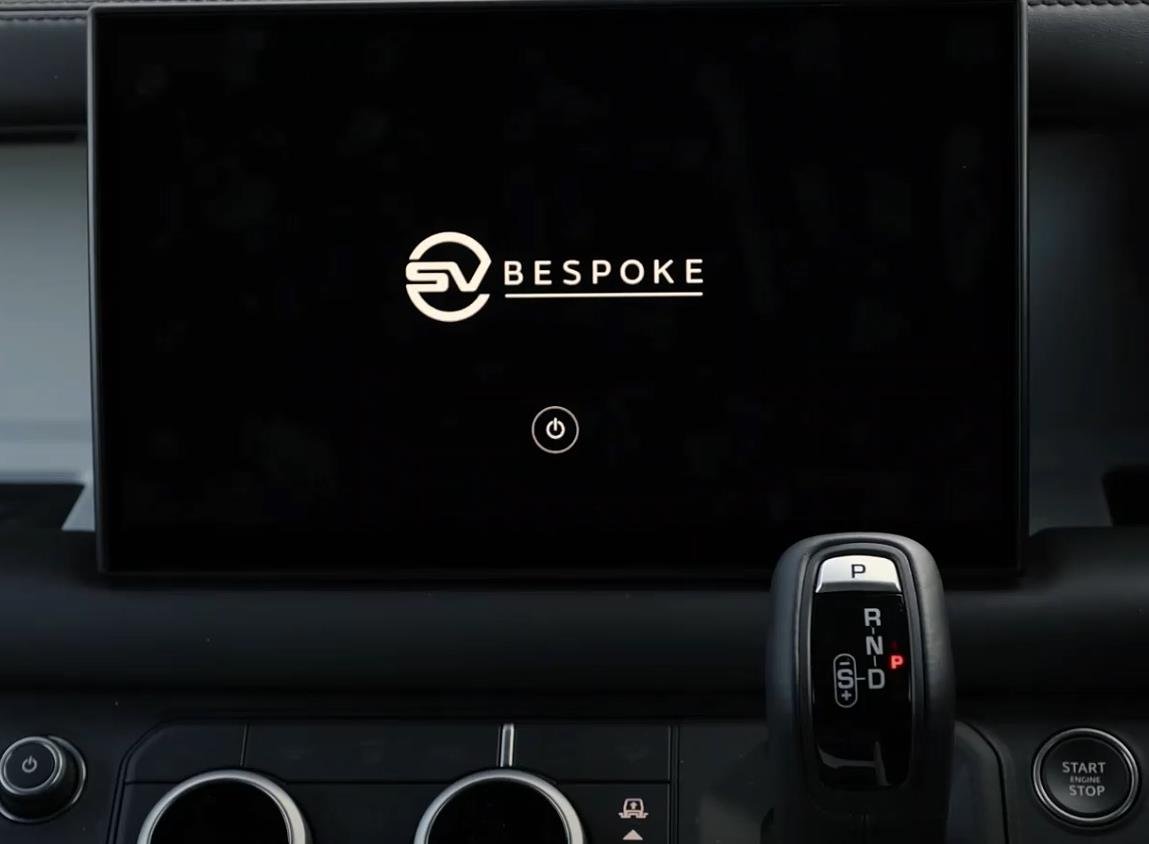
The SV Bespoke Welcome Screen is a software-driven feature executed by the Instrument Cluster (IC) module. It is not a simple bitmap but a sequenced animation or high-resolution graphic triggered by a specific vehicle event.
System Logic and CCF Integration
The system operates on an event-based trigger. When the vehicle's Body Control Module (BCM) detects an unlock signal followed by a door open signal, it broadcasts a CAN bus message. The Instrument Cluster, if configured correctly, interprets this message as the trigger to initiate the welcome sequence. The CCF contains two critical elements for this function:
- Feature Enable Switch: A binary parameter that activates the cluster's ability to listen for the welcome sequence trigger.
- Graphic Resource Link: A parameter that points to the specific animation or graphic file stored within the cluster's internal memory, specifying which SVO animation (e.g., Range Rover SV, F-Pace SVR) to display.
Modifying these parameters via JET in the TOPIx cloud environment instructs the cluster to enable the logic and call upon the correct graphic asset during the wake-up cycle.
Hypothetical Step-by-Step Process for Activation
Disclaimer: This is a generalized procedural outline. Always consult official JLR technical documentation for vehicle-specific instructions. This process often requires specific security access.
- Pre-Programming Compatibility Check: Connect a DOIP VCI to the vehicle. Perform a diagnostic scan of the Instrument Cluster to confirm its software level and hardware part number are compatible with the bespoke welcome screen feature.
- JET Session with Security Access: Log in to TOPIx with a valid subscription. Launch JET, input the VIN, and establish a secure diagnostic session. You may need to request a security token for this procedure.
- Mandatory CCF Backup: Before any modification, use JET to read and save a complete backup of the vehicle's current CCF, specifically the Instrument Cluster block.
- Configuration Editing: Navigate the CCF tree to the Instrument Cluster module. Locate the parameters for “Bespoke Welcome Screen” or “SVO Welcome Animation.” Change the status to ‘Enabled' and select the appropriate graphic resource identifier from the available list (e.g., “RANGE ROVER SV”, “SVR_ANIMATION”).
- Write and Validate Configuration: Write the modified CCF block back to the Instrument Cluster. The tool will provide a success confirmation. This process is often very quick.
- Module Reset and Sleep Cycle: Power down the vehicle and initiate a full sleep cycle by locking it and leaving it for 10-15 minutes. This allows the Instrument Cluster to perform a full shutdown and reboot.
- Functional Verification: Unlock the vehicle and open the driver's door. Observe the instrument cluster for the correct SV Bespoke Welcome Screen animation. The sequence should complete before the ‘Ready' indicator is displayed.
Essential Toolkit for Welcome Screen Programming
This procedure requires precise, professional-grade equipment.
- DOIP VCI: A reliable Vehicle Communication Interface that supports Diagnostics over Internet Protocol is essential for secure communication with the digital instrument cluster.
- Stable Power Supply: While the procedure is brief, a professional battery maintainer is recommended to prevent any risk of voltage drop during the CCF write process.
- JLR Software Access: An active JLR subscription providing access to TOPIx and the JLR Engineering Tool (JET) is mandatory, often with specific security clearance for personalization features.
- Dedicated Programming Hardware: For a guaranteed and reliable outcome, technicians should utilize the specialized JLR SV Bespoke Welcome Screen configuration tool from TOPIx Cloud, which is designed for this specific task.
Common Challenges and Technical Resolution
Technicians may encounter specific issues during this process:
- Blank Screen or “Script Error” on Cluster: This is the most common challenge. It indicates a mismatch between the CCF parameter and the actual graphic file in the cluster's memory. The solution is to ensure the correct, vehicle-specific graphic identifier is used. Referencing the CCF from a donor SVO vehicle can provide the correct value.
- Feature Enabled but No Animation Plays: The trigger event may not be recognized. Verify there are no faults in the BCM related to door or key fob recognition. A full IC reset and sleep cycle are also critical for the new configuration to become active.
- Incorrect Graphic Displayed: The CCF parameter is linked to the wrong graphic resource. This requires re-entering the CCF editor and selecting the alternative, correct identifier for the desired welcome screen.
- Security Access Denied in JET: This feature often requires a higher level of security authentication. Ensure your JLR account has the necessary permissions and that you have correctly followed the security access procedure within JET.
Conclusion
Activating the SV Bespoke Welcome Screen is a precise exercise in CCF editing that leverages the software capabilities of JLR's high-end digital instrument clusters. Success requires not only the correct tools, such as a DOIP VCI and JET access, but also a meticulous approach to selecting the exact graphic resource parameter. This process highlights the intersection of software configuration and luxury branding, allowing technicians to deliver a deeply personalized client experience.
For technicians and workshops undertaking advanced JLR diagnostic programming and bespoke JLR OEM retrofits, accessing reliable tools and expert support is crucial. For more information on specialized equipment and professional guidance, visit jlrupgrades.com.




Reviews
There are no reviews yet.