


Wi-Fi Hotspot Activation for Jaguar and Land Rover Vehicles
Enable a secure, high-speed 4G/LTE in-car network on your JLR vehicle. This professional activation service unlocks the factory Wi-Fi Hotspot functionality through precise Car Configuration File (CCF) editing. Your passengers connect up to eight devices to the internet through the vehicle’s dedicated roof-mounted antenna, delivering a more stable connection than a smartphone hotspot alone.
What Wi-Fi Hotspot Activation Delivers
The JLR Wi-Fi Hotspot transforms your vehicle into a mobile connectivity hub. The Telematics Control Unit (TCU) manages a dual-network architecture: an integrated 4G/LTE modem establishes the cellular data link, while a dual-band Wi-Fi radio broadcasts a password-protected 2.4 GHz or 5 GHz network inside the cabin. Network Address Translation (NAT) allows multiple client devices to share the single cellular connection seamlessly.
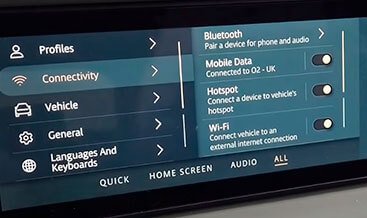
This activation restores the factory Hotspot menu on the Pivi Pro touchscreen, giving you full control over the SSID and password. You gain an OEM-grade connectivity solution that integrates directly with the vehicle’s electrical architecture, not an aftermarket add-on.
Key Technical Capabilities
- Up to 8 connected devices — smartphones, tablets, and laptops share the in-car 4G/LTE connection simultaneously.
- Dual-band Wi-Fi — the TCU broadcasts on 2.4 GHz or 5 GHz for flexible device compatibility and reduced interference.
- Roof-mounted antenna integration — the vehicle’s external aerial maintains a stronger cellular link than a handheld phone, particularly while moving.
- Pivi Pro native control — you configure the Hotspot name and 16-digit password directly through the vehicle’s touchscreen interface.
- Embedded SIM readiness — compatible vehicles use the factory eSIM for data services; certain configurations accept a data-only SIM card in the dedicated reader.
The Activation Process: CCF Coding and Module Coordination
Wi-Fi Hotspot activation is a software-defined configuration task. The feature requires coordinated CCF edits in two primary modules:
- Telematics Control Unit (TCU) — enabling the “Wi-Fi Hotspot,” “Internal Wi-Fi Antenna,” and data connection parameters.
- Infotainment Head Unit (HU) — activating the Hotspot menu and user interface controls so the SSID and password settings appear on the Pivi Pro screen.
A JLR technician performs the activation using the JLR Engineering Tool (JET) or Pathfinder via the TOPIx cloud platform, with a DOIP-capable Vehicle Communication Interface connected to the OBD-II port. After programming, a full vehicle sleep cycle allows the modules to reinitialise with the new configuration. The technician then verifies the Hotspot menu presence and confirms SSID/password configuration through the Pivi Pro connectivity settings.
Data Plan and Subscription Requirements
CCF coding enables the feature; internet access requires an active data subscription. Many JLR vehicles with Pivi Pro include a complimentary data plan period through the InControl account, and the Wi-Fi Enabled with Data Plan service operates on 4G/LTE networks with a fair usage policy. Where the vehicle uses a user-supplied SIM, the card must be data-only and carry a valid data allowance — voice SIMs will not provide Hotspot connectivity. You manage subscription activation and renewal through your JLR InControl account.
Vehicle Compatibility and Hardware Prerequisites
Wi-Fi Hotspot activation applies to JLR vehicles that already carry a 4G/LTE-capable TCU. The feature is available on vehicles equipped with Pivi Pro, InControl Touch Pro, and Connect/Connect Pro infotainment systems, depending on model year and market specification. A pre-activation network scan confirms TCU health and checks for telematics or antenna-related DTCs before any coding begins. If the vehicle lacks the required TCU hardware, a full retrofit becomes necessary first.
Why Professional Activation Matters
Activating the Wi-Fi Hotspot through CCF editing demands more than a menu toggle. The procedure requires a validated JET/Pathfinder session, a complete CCF backup, coordinated edits across the TCU and Head Unit, and a module reset sequence that follows JLR’s diagnostic protocols. An incomplete edit — for example, enabling only the TCU and overlooking the Head Unit — leaves the Hotspot menu invisible to the user. Professional activation ensures both modules align, the vehicle registers correctly on the cellular network, and the feature performs as designed.
Frequently Asked Questions
Does activation alone provide internet access?
No. CCF coding unlocks the Wi-Fi Hotspot functionality, but the vehicle still requires an active data plan through JLR InControl or a valid data-only SIM with an appropriate allowance.
Can I activate the Hotspot if my vehicle did not come with the feature from the factory?
Yes, provided the vehicle carries the necessary 4G/LTE TCU hardware. Activation then becomes a software configuration task. Vehicles without the hardware require a TCU retrofit before activation.
How many devices can connect at once?
The system supports up to eight simultaneous Wi-Fi client connections.
Will the Hotspot work while the vehicle is moving?
Yes. The system operates through the mobile phone network via the roof-mounted antenna, which helps maintain signal stability while driving. Coverage depends on local cellular network availability.
Ready to Activate Your JLR Wi-Fi Hotspot?
This activation service delivers the factory connectivity experience your vehicle was engineered to support. You receive OEM-grade CCF coding, coordinated module configuration, and a functional verification check that confirms the Hotspot menu, SSID, and password controls operate correctly on your Pivi Pro or InControl system.
Order the Wi-Fi Hotspot Activation service today and equip your Jaguar or Land Rover with a reliable, secure 4G/LTE in-car network for every journey.
References
- Land Rover Connectivity FAQs — Wi-Fi Enabled with Data Plan, roof-mounted antenna, 4G/LTE operation.
- JLR Wi-Fi Hotspot Wireless — Technical Configuration via CCF Editing (lr-retrofit.com).
- InControl User Guide — Wi-Fi Hotspot supports up to 8 devices.
- Land Rover Connectivity FAQs — Pivi Pro Hotspot activation via Settings > Connectivity.
- InControl Connect FAQs — data-only SIM and data plan requirements.
- JLR Wi-Fi Hotspot Activation Procedure — functional verification and sleep cycle.
- Jaguar Wi-Fi Hotspot — availability on Connect/Connect Pro and Pivi Pro systems.