

Apple CarPlay & Android Auto Pack – OEM Smartphone Integration

What This Retrofit Pack Includes
- A genuine Land Rover dual‑USB hub module that supports data communication and smartphone projection protocols. This hub replaces your existing charge‑only USB port and provides the high‑speed data link that CarPlay and Android Auto require.
- Vehicle‑specific USB cabling that connects the new hub to the InControl Touch Pro head unit (IMC). Every connector and cable route follows the original wiring diagram.
- Complete software enablement using JLR Pathfinder. We update the Car Configuration File (CCF) to register the “Smartphone Pack”, unlock CarPlay and Android Auto in the IMC’s operating system, and pair the new USB hub’s hardware ID with the vehicle network.
- A full function test that confirms both wired and wireless connections launch smoothly, audio routing works through the vehicle speakers, and steering‑wheel controls operate normally with Siri and Google Assistant.
Compatible Land Rover Vehicles
This retrofit works on any Land Rover equipped with the InControl Touch Pro infotainment system (10‑inch dual‑view or single‑view touchscreen) and the correct vehicle architecture. The following models are confirmed compatible:
| Model | Supported Years |
|---|---|
| Range Rover (L405) | 2017 – 2022 |
| Range Rover Sport (L494) | 2018 – 2022 |
| Discovery 5 (L462) | 2018 – 2024 |
| Range Rover Velar (L560) | 2018 – 2024 |
| Range Rover Evoque (L551) | 2019 – 2024 |
| Defender (L663) | 2020 – 2026 |
Your vehicle must run InControl Touch Pro (NOT InControl Touch or Touch Plus) and have the necessary MOST/APIX display hardware. We verify your VIN to guarantee full compatibility before ordering the USB hub kit.
How Smartphone Integration Works After the Retrofit
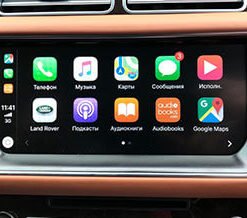
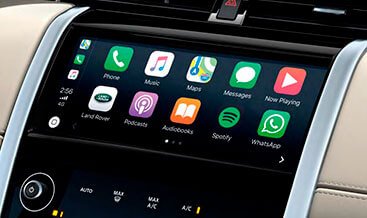
The new USB hub functions as the data gateway between your phone and the IMC (Infotainment Master Controller). When you connect your iPhone via the official Lightning cable—or when Bluetooth and Wi‑Fi pairing complete for wireless CarPlay—the IMC launches the Apple CarPlay interface. Android Auto operates similarly, using the USB connection for wired projection and the vehicle’s Wi‑Fi antenna for wireless Android Auto on supported devices. The touchscreen presents your familiar phone apps in an optimised layout, and the original rotary dial or touch controller (if fitted) navigates the menus without distraction. Voice commands trigger Siri or Google Assistant through the roof‑mounted microphone array, and turn‑by‑turn navigation directions play through the Meridian™ or standard audio system. You retain full access to the factory 4x4i screens, climate controls, and vehicle settings—the CarPlay/Android Auto interface overlays just the designated media and phone functions.
The Retrofit Process Step by Step
- You place your order and share your VIN. We source the exact USB hub module that matches your vehicle’s centre console trim and connector type.
- Our technician arrives with genuine Land Rover parts and JLR‑approved diagnostic equipment.
- We swap the USB hub inside your front centre console or armrest cubby. The original charge‑only module comes out; the new data‑capable hub slots directly into its place using the same mounting points.
- We install the dedicated USB cable that links the hub to the IMC. The cable runs neatly behind the dashboard trim, following the original harness paths.
- We configure the software with JLR Pathfinder. A CCF update adds the “Smartphone Pack” feature, and the IMC learns the new USB hub’s identity. The system restarts, and the CarPlay/Android Auto icons appear in the main menu bar.
- We test with your actual phone (or our test devices) to confirm both wired and wireless projection works flawlessly. You verify the audio quality, Siri/Google Assistant prompts, and that the system returns to the Land Rover home screen when you unplug or disconnect.
Why Choose LR‑Retrofit for This Upgrade
- 100% genuine integration – We use only Land Rover‑branded USB hubs and software patches that match your vehicle’s VIN. No cheap emulators, no third‑party boxes, no loss of vehicle functionality.
- Zero impact on vehicle warranty – The parts are original JLR components, and our software flash follows the manufacturer’s process exactly. Your dealer’s service tools can still diagnose and update the car without any conflicts.
- Mobile installation convenience – We complete the entire job at your home or office, saving you a dealership visit and often completing the work in under two hours.
- Future‑proof compatibility – The retrofit supports all current iOS and Android versions, and because it uses the factory software stack, the system continues to receive over‑the‑air updates from Land Rover when available.
Important Considerations
Vehicles that originally had only a single USB port (charge‑only) will need the corresponding dual‑USB hub with the data‑enabled port. The installation does not alter the appearance of your centre console; the new hub sits flush in the original aperture. Wireless CarPlay requires that your phone supports the feature (iPhone 5 or later with iOS 9+, or compatible Android devices running Android 11+ with 5 GHz Wi‑Fi). We recommend using a genuine Apple Lightning cable or a high‑quality USB‑C cable for the most stable wired connection.
After the retrofit, the standard Land Rover navigation, media, and phone functions remain fully operational. CarPlay and Android Auto appear as additional menu options, so you can switch between factory and smartphone interfaces at any time. The system also respects your privacy: no vehicle data is shared with Apple or Google beyond the standard anonymised telematics.
Bring Apple CarPlay and Android Auto to your Land Rover today.