
JLR Apple CarPlay & Android Auto Pack Activation — OEM Smartphone Integration
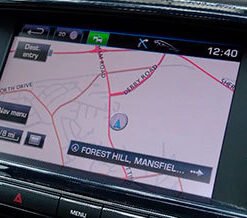
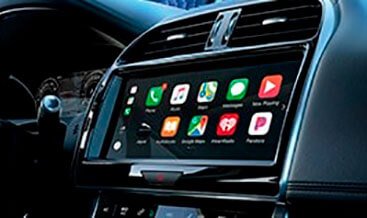
We activate factory Apple CarPlay and Android Auto on your Jaguar Land Rover vehicle. JLR builds the necessary hardware into most models from 2016 onwards, but locks the Smartphone Pack within the Car Configuration File for market and trim segmentation. Our service unlocks that dormant feature through the CCF and the JLR Pathfinder platform, so your factory touchscreen displays the native smartphone interface. You gain full app projection, voice assistant pass-through and steering wheel media control, all running inside the OEM infotainment unit. We match every activation to your VIN and your As-Built record.
Why Activate the JLR Smartphone Pack
Apple CarPlay and Android Auto have become essential features for modern driving. They project your phone’s navigation, music, messaging and calling apps onto the factory touchscreen in an optimised layout that keeps your attention on the road. JLR ships most vehicles with the required hardware, yet many remain locked because the factory configuration disables the feature.
When we activate the Smartphone Pack, you gain:
- Native full-screen app projection onto your factory touch display.
- Siri and Google Assistant voice commands through the vehicle-mounted microphone.
- Steering wheel media buttons and volume controls that function natively with projected apps.
- Wired and wireless connection support, depending on your infotainment generation and TCU hardware.
- Full access to factory navigation, media and vehicle settings alongside smartphone content.
- No external adapters, no latency and no audio drop-outs.
- A fully reversible activation that you can restore to stock configuration for dealer visits, over-the-air updates or vehicle resale.
Third-party dongle-based solutions create latency, audio drop-outs and CAN-bus communication conflicts. Our OEM-aligned workflow activates the genuine factory feature inside the infotainment unit, which delivers stable performance and preserves every original vehicle function.
Compatibility and Vehicle Coverage
The correct activation path depends on your infotainment generation and existing hardware. We classify vehicles into three groups:
Hardware-capable, software-locked (2017–2019): Models such as the Range Rover Sport (L494, 2017–2019), Discovery 5 (L462, 2017–2019), Velar (L560, 2017–2019), Range Rover L405 (2017–2022), Jaguar F-Pace (X761, 2017–2019), XE (X760, 2017–2019) and XF (X260, 2017–2019) carry InControl Touch Pro hardware that physically supports CarPlay and Android Auto. The factory disables the feature in the CCF, so a configuration activation unlocks full functionality[reference:0].
Pivi and Pivi Pro (2020 onwards): The Defender (L663, 2020+), Discovery (L462, 2021+), Range Rover (L460, 2022+), Range Rover Sport (L461, 2023+) and Jaguar F-Pace (2021+ facelift) carry native CarPlay and Android Auto software stacks. JLR locks the Smartphone Pack within the CCF for market and trim segmentation, so our activation exposes the native feature menu[reference:1].
Requirements for activation: Your vehicle must run InControl Touch Pro, Touch Pro Duo or Pivi Pro. The system also requires the correct data-capable USB hub. Many vehicles ship with a charge-only USB port that cannot support smartphone projection protocols. We verify your hardware during the VIN check and supply the genuine JLR USB hub where your build requires one[reference:2]. For wireless CarPlay and Android Auto, your vehicle needs a 4G/LTE TCU that supports both Wi-Fi and Bluetooth connectivity[reference:3].
How the Activation Process Works
We keep the activation organised and predictable:
- VIN verification: You send your 17-character VIN. We identify your infotainment platform, current IMC firmware level, USB hub type and TCU generation.
- Hardware assessment: We confirm whether your vehicle carries the required data-capable USB hub. Where it does not, we prepare the correct JLR hub module and vehicle-specific USB cabling for your centre console configuration.
- Firmware preparation: For some 2018–2019 vehicles, the IMC requires a firmware update to phase 4 (version 19C or later) before the Smartphone Pack becomes available[reference:4]. We prepare the correct firmware package where needed.
- CCF activation: We edit the Car Configuration File to enable the Apple CarPlay and Android Auto parameters, then write the file back to the gateway module through JLR Pathfinder[reference:5].
- Verification: You complete a full function test that confirms both wired and wireless connections launch smoothly, audio routes through the vehicle speakers, and steering wheel controls operate normally with Siri and Google Assistant.
Our technical team stays available throughout the process, and we answer questions at any stage.
JLR Technical Specification
The Smartphone Pack runs on the IMC (Infotainment Master Controller) over HS-CAN and USB media interfaces. The CCF holds the feature flags that define your vehicle’s smartphone projection capability. The key parameter resides at CCF address 0x2377, where the “Connect and View” setting determines the projection type. Values include 01 for not fitted, 04 for CarPlay fitted only, 08 for Android Auto fitted only and 0A for both CarPlay and Android Auto fitted[reference:6].
When we activate the Smartphone Pack, we set the correct value at address 0x2377, then write the configuration back against your As-Built record. The gateway module distributes the updated parameters across the network, and the IMC applies the new feature set at the next system initialisation. The IMC then learns the new USB hub’s hardware identity where one is fitted, and the system restarts to complete the activation[reference:7].
For wireless operation, the vehicle’s TCU provides the Wi-Fi and Bluetooth link that CarPlay and Android Auto require. Vehicles built with 3G telematics hardware cannot support wireless projection and require a 4G/LTE TCU replacement for full wireless functionality[reference:8]. Wired operation through the USB hub works independently of the TCU generation.
Our activation writes a secure licence block to the IMC’s configuration and enables the feature through authorised CCF parameter changes. We do not overwrite core infotainment firmware, and the activation produces zero permanent DTC fault codes or system warnings. All coding changes are fully reversible.
What You Receive
- A VIN-matched CCF activation for Apple CarPlay and Android Auto.
- A genuine JLR data-capable USB hub and vehicle-specific cabling where your build requires one.
- IMC firmware preparation where your vehicle needs a phase update.
- Clear instructions for your diagnostic platform, with platform-specific steps.
- Remote technical support throughout the activation.
- Post-activation verification guidance, including smartphone pairing and audio routing tests.
Order Your JLR Apple CarPlay & Android Auto Activation
Add the product to your cart and provide your VIN at checkout. We verify your vehicle, confirm the required hardware and prepare the correct activation for your build. Contact us first if you would like compatibility confirmed before you order. Unlock the factory Smartphone Pack on your Land Rover or Jaguar, and enjoy stable native Apple CarPlay and Android Auto with OEM-level reliability.