

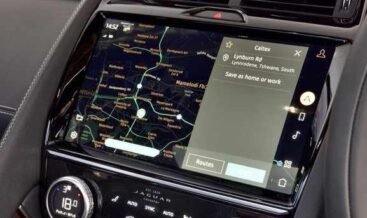


Navigation Update
Navigation Update installs the latest genuine map data on your Jaguar or Land Rover infotainment system. Road networks change constantly, and a navigation system running older mapping guides you down roads that no longer exist while missing junctions that opened last season. This service matches the correct map package and licence to your VIN, prepares the installation media, and completes the update through the vehicle’s USB port or over-the-air pathway. You gain current road geometry, revised junction layouts, updated points of interest, and accurate traffic information across your whole region.
Two Platform Families, Two Update Paths
JLR equips its vehicles with three infotainment generations, and each one updates differently. Older vehicles with InControl Touch Pro and Touch Pro Duo receive map data through a USB installation. These platforms store mapping on internal storage and require a licence activation before the new data becomes available[reference:0]. Newer vehicles with Pivi Pro support both over-the-air delivery and USB installation, and the vehicle can retrieve map packages directly once we activate the navigation service entitlement[reference:1].
Each region ships its own map package. Africa, Australasia and Pacific, Europe and Russia, Latin America, North America, South East Asia, and Turkey all carry separate data sets with regional licensing terms[reference:2]. We identify your market from your VIN, select the matching package, and confirm the correct licence before we prepare anything.
How the Update Works
We start by reading your infotainment software level and your current map database version through the JLR-approved diagnostic pathway. That scan confirms the platform generation, the installed map region, and the remaining storage capacity. We verify that your head unit software supports the incoming map version, because map data and head unit software must stay compatible.
We then download the genuine map package and write it to a USB drive formatted to the specification the platform requires. The system supports FAT32 or NTFS formats, and we recommend a USB 3.0 drive with at least 20GB of capacity for larger regional packages[reference:3]. You insert the drive into the vehicle’s USB port and follow the on-screen prompts. The head unit copies the new data, verifies the file integrity, and activates the licence against your VIN. The process takes between 45 and 90 minutes depending on package size and platform speed.
Once the transfer completes, we confirm the new database version through the navigation menu and check that the system loads addresses, calculates routes, and displays junction views correctly. We also verify traffic information reception and confirm that voice guidance responds as expected.
Key Features
- VIN-matched map packages deliver the correct regional data for your exact vehicle.
- Genuine licensed HERE map data carries full manufacturer entitlement and legal coverage.
- Touch Pro, Touch Pro Duo, and Pivi Pro support covers every current JLR infotainment generation.
- Licence activation unlocks the new database against your vehicle identification.
- Head unit compatibility check confirms software support before any data transfer begins.
- USB installation media preparation formats and loads the drive to platform specification.
- Over-the-air entitlement activation enables Pivi Pro vehicles to receive future updates directly.
- Updated points of interest include fuel stations, charging points, restaurants, and service locations.
- Junction view and lane guidance reflect current road geometry for confident navigation.
- Traffic information reception verification confirms live data delivery after the update.
- Post-installation testing validates address entry, route calculation, and voice guidance.
Technical Specifications
| Parameter | Specification |
|---|---|
| Service Name | Navigation Update |
| Supported Platforms | InControl Touch Pro, Touch Pro Duo, Pivi Pro |
| Map Data Provider | Genuine HERE Technologies licensed mapping |
| Installation Methods | USB installation or over-the-air delivery |
| Regional Packages | Africa, Australasia and Pacific, Europe and Russia, Latin America, North America, South East Asia, Turkey |
| USB Format Requirement | FAT32 or NTFS (exFAT not supported); USB 3.0 recommended |
| USB Capacity Requirement | 20GB to 30GB depending on region |
| Licence Method | VIN-matched activation entitlement |
| Compatibility Check | Head unit software level verified against incoming map version |
| Typical Duration | 45 to 90 minutes depending on package size and platform |
| Vehicle State Requirement | Ignition on with stabilised power supply throughout the transfer |
| Post-Update Verification | Database version check, route calculation test, traffic reception test |
Vehicle Compatibility
Navigation Update supports Jaguar and Land Rover vehicles fitted with a navigation-capable infotainment system. Compatible models include:
- Range Rover (L405, L460)
- Range Rover Sport (L494, L461)
- Range Rover Velar (L560)
- Range Rover Evoque (L538, L551)
- Discovery (L462) and Discovery Sport (L550)
- Defender (L663)
- Jaguar F-Pace, E-Pace, I-Pace
- Jaguar XE, XF, and XJ models with compatible infotainment
Your vehicle must carry a compatible infotainment head unit. We verify your VIN, your infotainment generation, and your current map version before we prepare the package. Pivi Pro vehicles equipped with an active Connected Navigation subscription receive automatic over-the-air map updates for their current country, and a manual USB installation adds full regional coverage[reference:4].
What the Update Includes
- Infotainment software and current map version scan through the JLR-approved pathway.
- Regional package identification matched to your VIN and market.
- Head unit compatibility verification against the incoming map version.
- Genuine licensed HERE map data with VIN-matched licence activation.
- USB installation media preparation to platform specification.
- Over-the-air entitlement activation for Pivi Pro vehicles where available.
- Step-by-step installation guidance throughout the transfer.
- Post-installation verification of database version, routing, junction views, and traffic reception.
- Written documentation recording previous and new map database versions.
| Make Model | E-PACE 2021+ |
|---|
Related products
Features Activation
Features Activation
Features Activation

Features Activation

Features Activation

Features Activation
Features Activation
Features Activation