


Navigation Update – InControl Touch Plus (GEN 2.1) for Land Rover & Jaguar
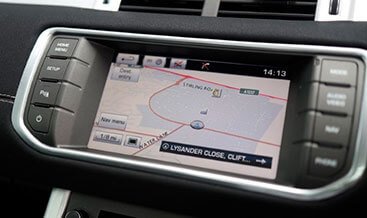
Road networks change every year. New junctions open, speed limits shift, and entire retail parks relocate. Your factory InControl Touch Plus (GEN 2.1) navigation system only knows the map data it received when it left the production line. Our Navigation Update service loads the latest available HERE map release onto your head unit, so your route guidance reflects the roads you actually drive.
You keep the factory head unit, the factory screen, and the factory integration. We supply the correct map data for your VIN, guide the installation, and verify the result once the update completes.
Why Refresh Your Navigation Map Data?
Accurate map data improves every journey. Your system calculates shorter routes, recognises new motorway links, and presents correct speed-limit information on the cluster and centre display. Junction views and lane guidance also match the current road layout, which reduces hesitation at complex interchanges.
An updated system also restores confidence in the points-of-interest database. Fuel stations, charging points, service areas, and dealer locations appear with current addresses and contact details. For vehicles used commercially or on long-distance family travel, that accuracy saves time on every trip.
Key Benefits
- Latest HERE map release – You receive the newest map data available for the GEN 2.1 platform in your region.
- VIN-verified licence – We match the map licence to your vehicle identification number, so the update activates cleanly.
- Factory system retained – Your original head unit, display, and steering-wheel controls continue to operate exactly as before.
- Guided USB installation – We provide the prepared media and step-by-step instructions, and we stay available throughout the process.
- Post-update verification – We confirm the map version, licence status, and route calculation after the installation completes.
How the Update Works
The InControl Touch Plus (GEN 2.1) head unit stores map data on internal flash memory and reads its licence from a configuration value held in the vehicle’s Car Configuration File (CCF). Our update process replaces the stored map data with the current release and confirms that the licence entry matches the new data set.
You load the prepared map package from a USB mass storage device through the vehicle’s media interface. The head unit copies the data, validates the checksum, and then restarts the navigation application. Where the licence entry requires adjustment, we apply the correct CCF parameter through JLR SDD or Pathfinder over the OBD-II port.
Technical Specifications
| Parameter | Specification |
|---|---|
| Compatible system | InControl Touch Plus (GEN 2.1), IAM 2.1 head unit |
| Map data provider | HERE (formerly Navteq) |
| Media type | USB mass storage, FAT32 file system |
| Required capacity | 32 GB minimum, Class 10 or faster recommended |
| Installation location | Vehicle USB media interface |
| Installation duration | 45–90 minutes, depending on region package size |
| Diagnostic platforms | JLR SDD (2010–2016), Pathfinder where applicable |
| Diagnostic interface | J2534 pass-thru device (VCM II, Mongoose, or equivalent) |
| Power supply requirement | 13.5 V minimum, stable supply recommended |
| Hardware required | None beyond the supplied USB media |
Vehicle Compatibility
We confirm compatibility from your VIN before dispatch. The Navigation Update supports these GEN 2.1 equipped platforms:
- Land Rover Discovery 4 (L319) – 2012–2016
- Range Rover (L405) – 2013–2016
- Range Rover Sport (L494) – 2014–2016
- Range Rover Evoque (L538) – 2012–2018
- Land Rover Discovery Sport (L550) – 2015–2016
- Jaguar XF (X250 facelift) – Selected model years
- Jaguar XJ (X351) – Selected model years
- Jaguar F-Type – Selected model years
Vehicles fitted with the earlier GEN 2.0 system or the later InControl Touch Pro platform require a different map package. Please share your VIN and current map version, and we identify the correct release for your vehicle within one business day.
Installation and Support
You complete the installation from your own premises. We prepare the USB media with the correct regional map package, then talk you through the sequence: ignition on, engine running or connected to a stable charger, media inserted, update confirmed on screen, and restart completed.
Our technician remains available throughout the session. Once the head unit reports the new map version, we verify the licence status, check that route calculation and traffic services operate correctly, and record the installed version for your service file. You also receive guidance on safe eject procedure, so future updates run smoothly.
Important: Keep the vehicle connected to a stable power supply throughout the installation. An interrupted update can leave the navigation application in a recovery state, and we advise against starting the process with a marginal battery.
What’s Included
- VIN verification and regional map package selection
- Prepared USB media with the current HERE map release
- Step-by-step printed and digital installation guide
- Remote technical support during the installation
- CCF licence confirmation where required
- Post-update verification and version record
| Make Model | Range Rover Evoque 2016-2019 |
|---|
Related products
Features Activation
Features Activation
Features Activation
Features Activation
Features Activation
Features Activation
Features Activation
Features Activation